
TORNADO CASH
TORNADO CASH
BLOCKCHAIN

DEPOSIT


METAMASK


.gif?alt=media&token=3b605bd9-6922-4334-8b02-7fdc01580127)


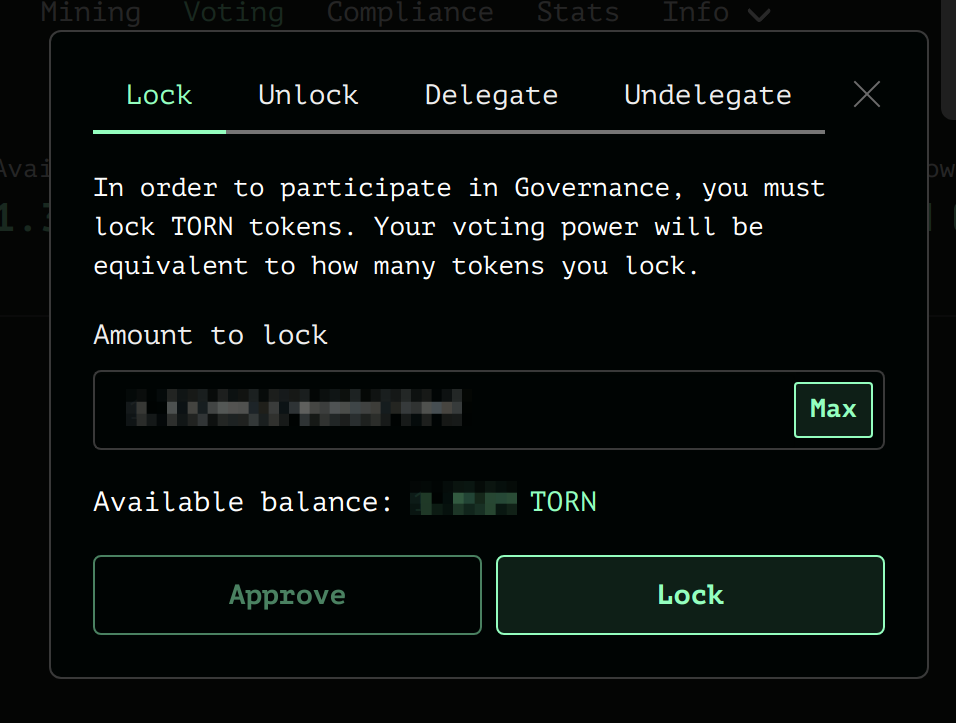
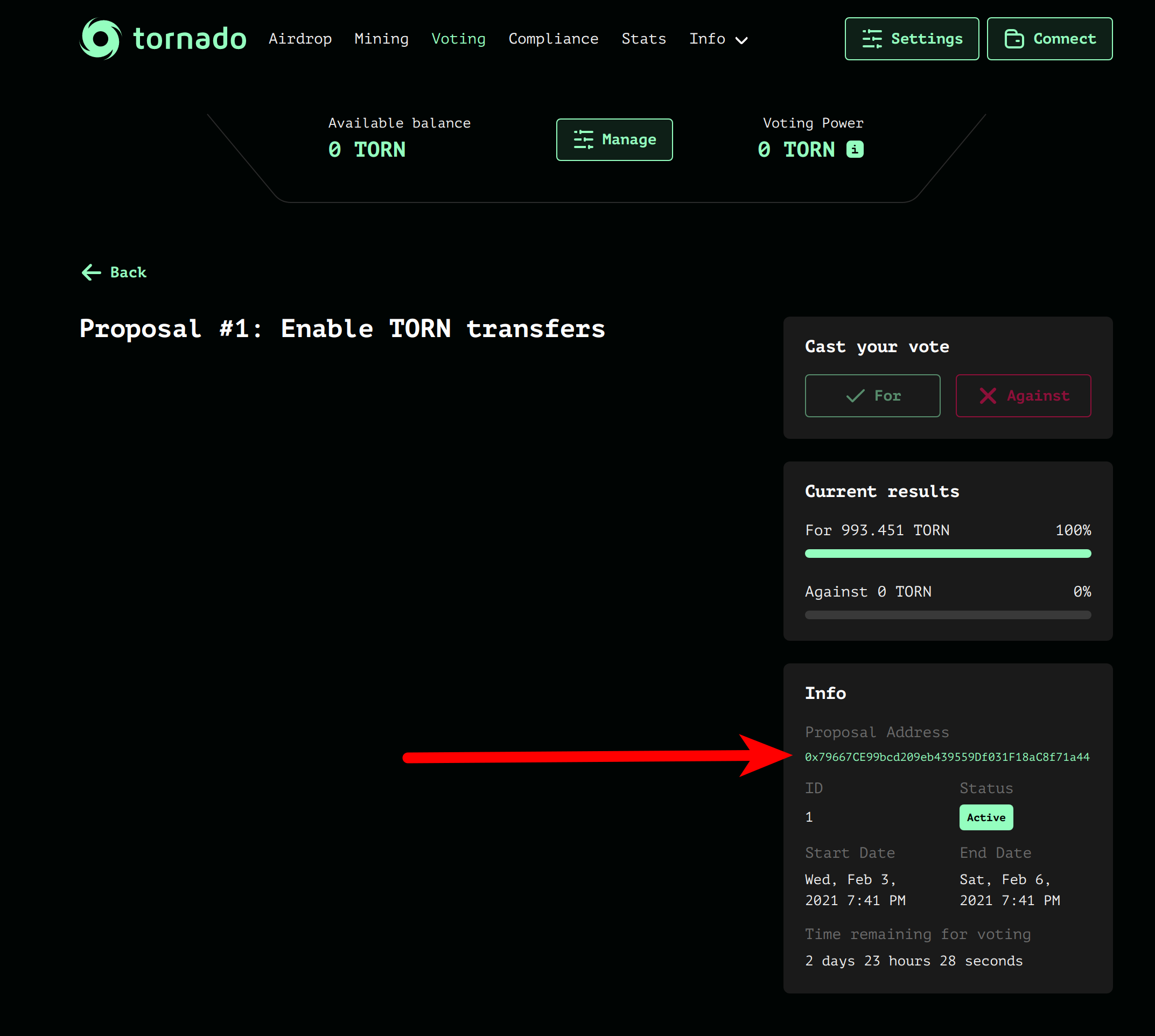
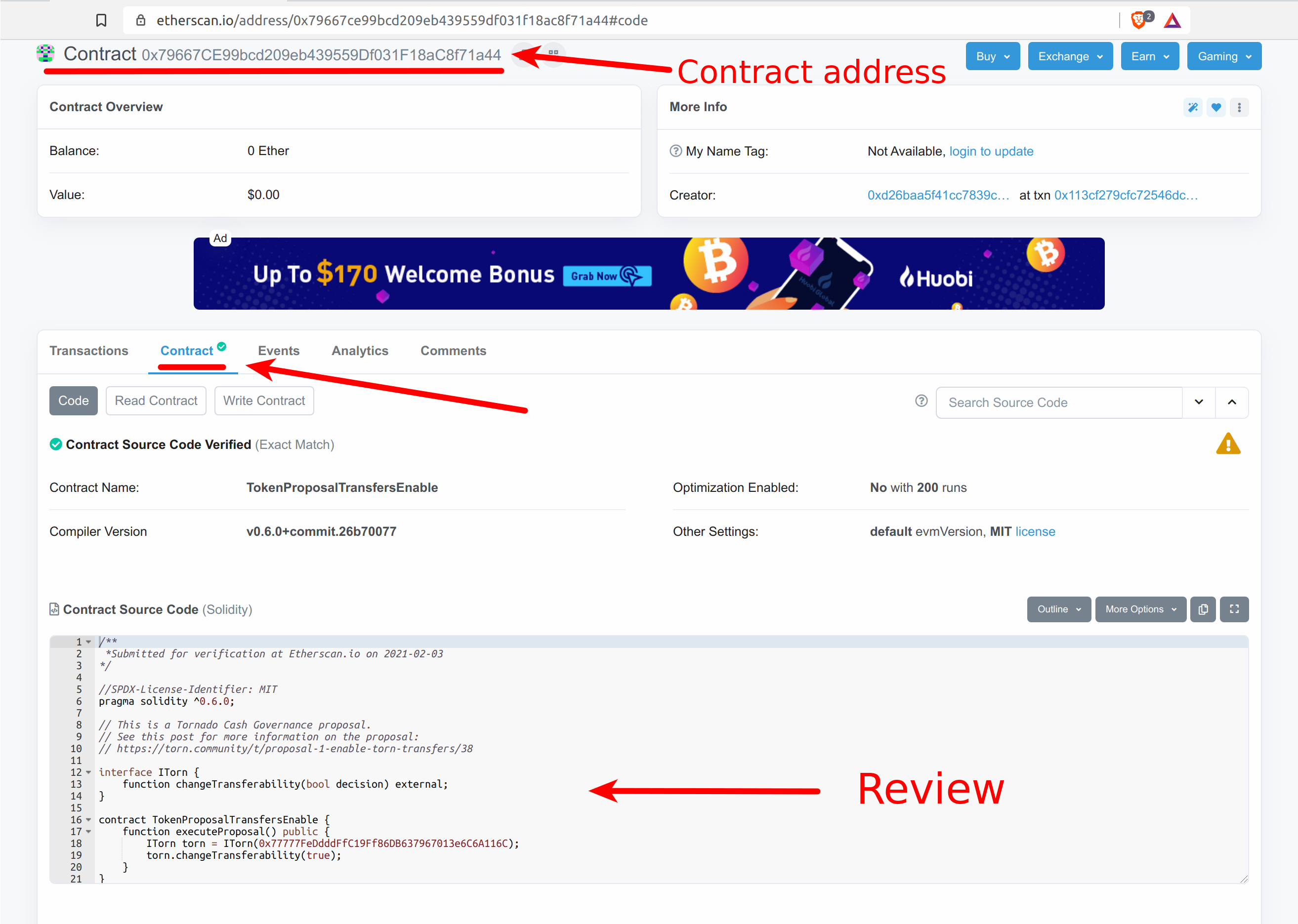
.png?alt=media&token=6ea53f5c-5382-449f-a62a-3b0965d4a5f9)
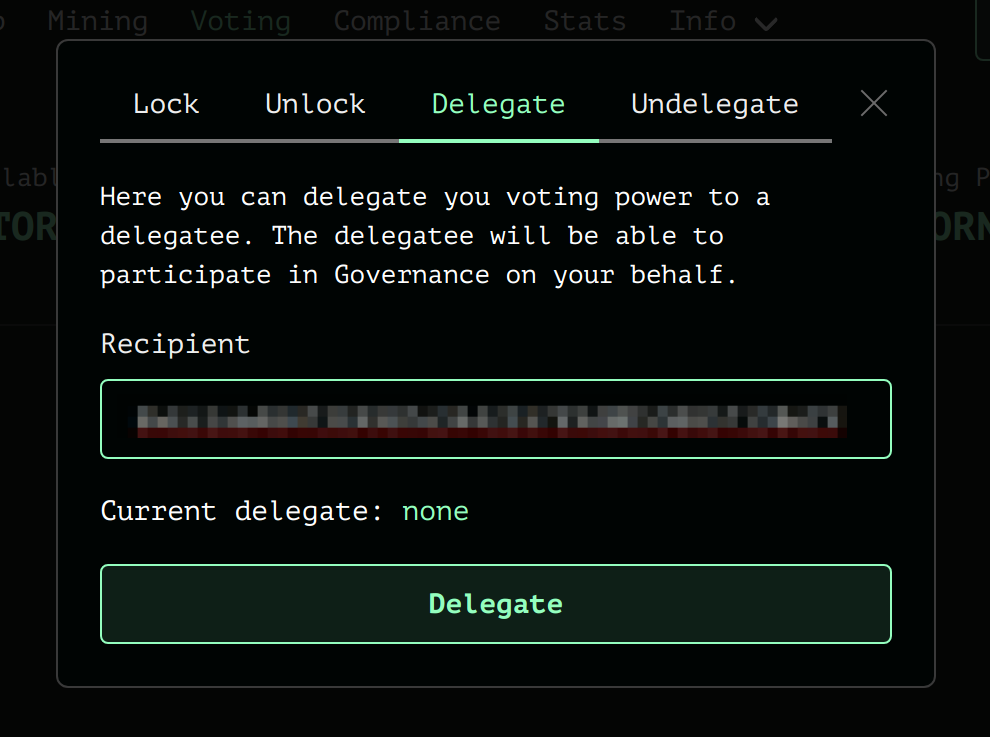


 3\. Click on Managen
 4\. Click on Add
 5\. Choose an amount to add and click on Supply
 6\. Click on confirm
 #### 2. Remove liquidity
1.
#### 2. Remove liquidity
1. .png?alt=media&token=1013ae80-0b58-4cfb-96e3-1cdc28891f57) 3\. Click on Manage
3\. Click on Manage
.png?alt=media&token=5d1ff830-7d2b-42fd-b3fb-d7cb783c096b) 4\. Click on Remove
4\. Click on Remove
.png?alt=media&token=8700d1e1-3378-4b6c-90ea-30da90c8e60e) 5\. Choose the percentage you wish to withdraw
5\. Choose the percentage you wish to withdraw
 5\. Click on confirm
 And that's it!🎉
# How to become a relayer?
Learn how to become a relayer on Tornado Cash, including setup steps, requirements, and best practices for optimal performance
Following the execution of [Tornado Cash 10th governance proposal](https://tornadoeth.cash/governance/10), anyone can become a relayer for Tornado Cash users.
The only condition to be included on the Tornado Cash UI is to lock a min. of `300 TORN`\*. To remain listed, it is needed to keep enough TORN locked (\~`40 TORN` at the moment in April 2022) to be able to pay back the transaction fee to the staking contract.
\**This minimum stake can be changed by a governance vote at any time.*
Relayers form an essential & necessary part of the Tornado Cash ecosystem. Their use guarantees privacy as they solve the infamous fee payment dilemma : how to pay fees for token withdrawals from a pool while maintaining anonymity?
Therefore, relayers act as third parties and manage the entire withdrawal. They pay for transaction fees by deducting them directly from the transferred amount. They also charge an additional fee for their services.
Since the implementation of the [Relayer Registry proposal](https://tornadoeth.cash/governance/10), the protocol collects a fee directly from the relayer’s staked balance through the `StakingReward` contract for each withdrawal. This fee percentage may vary from one pool to another and is also subject to change through on-chain governance.
Currently, it is fixed at `0.3%` . Some pools remain without fees, either because the instance is too small to assign a fee (0.1 ETH, 100 DAI/USDT, 1000 DAI/USDT), or because there is not enough liquidity on Uni v3 (all cDAI instances).
## How to Become a Relayer?
Anyone can become a relayer for the protocol in **6 simple steps** through a [Relayer Registry User Interface (UI)](https://relayers-network.tornadoeth.cash/).Below you will find everything your need to join our relayers' club & get listed on Tornado Cash decentralized relayer registry.
### 1. Warning: Understand & Accept Potential Risks
Before you commit to sharing part of your journey with Tornado Cash users as a relayer, you need to understand & accept all potential risks of being a relayer for the protocol.
#### How a Relayer is chosen by user interface
The formula for designating a relayer is as follows:
* The list of all registered relayers is retrieved from the Relayer Registry smart contract.
* For each relayer, calculate a score based on its staked TORN and its fee. The higher the stake, the higher the score is; the higher the fee, the lower the score is. For Ethereum mainnet, the formula used to calculate the score is `stake * [1 - 25*(fee-0.33)^2]`; for sidechains, the formula is `stake * [1 - 11.89*(fee-0.01)^2]`.
* Then randomly pick a relayer, weighted by its calculated score.
### 2. Set up Relayer
The first concrete step is to run the Tornado Cash Relayer software for Ethereum Mainnet on your computer. All steps are outlined in the protocol's github. To complete this task successfully, you will have to carefully follow [these instructions](https://github.com/tornadocashdev/tornado-relayer#deploy-with-docker-compose).
{% embed url="
And that's it!🎉
# How to become a relayer?
Learn how to become a relayer on Tornado Cash, including setup steps, requirements, and best practices for optimal performance
Following the execution of [Tornado Cash 10th governance proposal](https://tornadoeth.cash/governance/10), anyone can become a relayer for Tornado Cash users.
The only condition to be included on the Tornado Cash UI is to lock a min. of `300 TORN`\*. To remain listed, it is needed to keep enough TORN locked (\~`40 TORN` at the moment in April 2022) to be able to pay back the transaction fee to the staking contract.
\**This minimum stake can be changed by a governance vote at any time.*
Relayers form an essential & necessary part of the Tornado Cash ecosystem. Their use guarantees privacy as they solve the infamous fee payment dilemma : how to pay fees for token withdrawals from a pool while maintaining anonymity?
Therefore, relayers act as third parties and manage the entire withdrawal. They pay for transaction fees by deducting them directly from the transferred amount. They also charge an additional fee for their services.
Since the implementation of the [Relayer Registry proposal](https://tornadoeth.cash/governance/10), the protocol collects a fee directly from the relayer’s staked balance through the `StakingReward` contract for each withdrawal. This fee percentage may vary from one pool to another and is also subject to change through on-chain governance.
Currently, it is fixed at `0.3%` . Some pools remain without fees, either because the instance is too small to assign a fee (0.1 ETH, 100 DAI/USDT, 1000 DAI/USDT), or because there is not enough liquidity on Uni v3 (all cDAI instances).
## How to Become a Relayer?
Anyone can become a relayer for the protocol in **6 simple steps** through a [Relayer Registry User Interface (UI)](https://relayers-network.tornadoeth.cash/).Below you will find everything your need to join our relayers' club & get listed on Tornado Cash decentralized relayer registry.
### 1. Warning: Understand & Accept Potential Risks
Before you commit to sharing part of your journey with Tornado Cash users as a relayer, you need to understand & accept all potential risks of being a relayer for the protocol.
#### How a Relayer is chosen by user interface
The formula for designating a relayer is as follows:
* The list of all registered relayers is retrieved from the Relayer Registry smart contract.
* For each relayer, calculate a score based on its staked TORN and its fee. The higher the stake, the higher the score is; the higher the fee, the lower the score is. For Ethereum mainnet, the formula used to calculate the score is `stake * [1 - 25*(fee-0.33)^2]`; for sidechains, the formula is `stake * [1 - 11.89*(fee-0.01)^2]`.
* Then randomly pick a relayer, weighted by its calculated score.
### 2. Set up Relayer
The first concrete step is to run the Tornado Cash Relayer software for Ethereum Mainnet on your computer. All steps are outlined in the protocol's github. To complete this task successfully, you will have to carefully follow [these instructions](https://github.com/tornadocashdev/tornado-relayer#deploy-with-docker-compose).
{% embed url="
TORNADO CASH - SET UP RELAYER
.png?alt=media&token=301e20cd-409b-45d9-a41a-870a1c8c2a67)


TORNADO CASH - STAKING

TornadoCash RPC
MEV BLOCKER

Metamask
Metamask
Metamask
.gif?alt=media&token=84081376-719b-4f08-8934-47902b373a82) You can also click on **Settings** on the top right of the page then click on **Connect your wallet.**
You can also click on **Settings** on the top right of the page then click on **Connect your wallet.**
 ## **Metamask wallet**
If you have a Metamask wallet, you have to make sure you **already have the extensions installed** on your browser. *If you don't know how to install it, you can check this* [*tutorial*](/generals/tornado-cash-rpc) *before the next step.*
1. Once you have the extension installed, click on **Connect**.
2. A pop up page will open up asking if you wish to connect your wallet to Tornado Cash.
3. Click on **Next,** then **Connect**.
4. You are now connected to Tornado Cash.
## **Metamask wallet**
If you have a Metamask wallet, you have to make sure you **already have the extensions installed** on your browser. *If you don't know how to install it, you can check this* [*tutorial*](/generals/tornado-cash-rpc) *before the next step.*
1. Once you have the extension installed, click on **Connect**.
2. A pop up page will open up asking if you wish to connect your wallet to Tornado Cash.
3. Click on **Next,** then **Connect**.
4. You are now connected to Tornado Cash.
 ## WalletConnect
For other wallets, **you should click on WalletConnect**. You will have to use your phone since many wallets do not have Desktop applications yet. **It generates a QR code that needs to be scanned.**
## WalletConnect
For other wallets, **you should click on WalletConnect**. You will have to use your phone since many wallets do not have Desktop applications yet. **It generates a QR code that needs to be scanned.**
 ### **Trustwallet**
To connect your wallet, you will need your phone. If you have a TrustWallet wallet, you should open the application on your smartphone then follow the next steps:
1. Click on **Settings**.
2. Click on **WalletConnect**.
3. Scan the QRCode on Tornado Cash's page.
4. Click on **Connect**.
5. You are now connected with Tornado Cash.
### **Trustwallet**
To connect your wallet, you will need your phone. If you have a TrustWallet wallet, you should open the application on your smartphone then follow the next steps:
1. Click on **Settings**.
2. Click on **WalletConnect**.
3. Scan the QRCode on Tornado Cash's page.
4. Click on **Connect**.
5. You are now connected with Tornado Cash.
 **ImToken**
To connect your wallet, you will need your phone. If you have a ImToken wallet, you should open the application then follow the next steps:
1. **Click** on the icon (top right).
2. **Scan** the QRCode on Tornado Cash's page.
3. **Click** on Connect.
4. You are now connected with Tornado Cash.
**ImToken**
To connect your wallet, you will need your phone. If you have a ImToken wallet, you should open the application then follow the next steps:
1. **Click** on the icon (top right).
2. **Scan** the QRCode on Tornado Cash's page.
3. **Click** on Connect.
4. You are now connected with Tornado Cash.
%20(1).gif?alt=media) ### **Argent Wallet**
To connect your wallet, you will need your phone. If you have a Argent wallet, you should open the application then follow the next steps:
1. **Click** on the Send (bottom right).
2. **Click** on the scan icon (top right).
3. Scan the QRCode on Tornado Cash's page.
4. You are now connected with Tornado Cash.
### **Argent Wallet**
To connect your wallet, you will need your phone. If you have a Argent wallet, you should open the application then follow the next steps:
1. **Click** on the Send (bottom right).
2. **Click** on the scan icon (top right).
3. Scan the QRCode on Tornado Cash's page.
4. You are now connected with Tornado Cash.
.gif?alt=media) ### **Other wallets**
For others wallets, steps might be really similar: **WalletConnect's QR code needs to be scanned in order to link your wallet to Tornado Cash.** Make sure to always check for a scanning icon (often located on the landing page or the settings section on your wallet's application).
# Deposit & Withdraw
Learn how to deposit and withdraw securely with Tornado Cash Classic. A step-by-step guide to ensure private, anonymous transactions on Ethereum
This tutorial is a step-by-step explanation of how to deposit & withdraw your funds. If you want to understand how the internal system of Tornado.cash works, please refer to this [tutorial](/tornado-cash-classic/how-to-connect-your-wallet).
### **Other wallets**
For others wallets, steps might be really similar: **WalletConnect's QR code needs to be scanned in order to link your wallet to Tornado Cash.** Make sure to always check for a scanning icon (often located on the landing page or the settings section on your wallet's application).
# Deposit & Withdraw
Learn how to deposit and withdraw securely with Tornado Cash Classic. A step-by-step guide to ensure private, anonymous transactions on Ethereum
This tutorial is a step-by-step explanation of how to deposit & withdraw your funds. If you want to understand how the internal system of Tornado.cash works, please refer to this [tutorial](/tornado-cash-classic/how-to-connect-your-wallet).
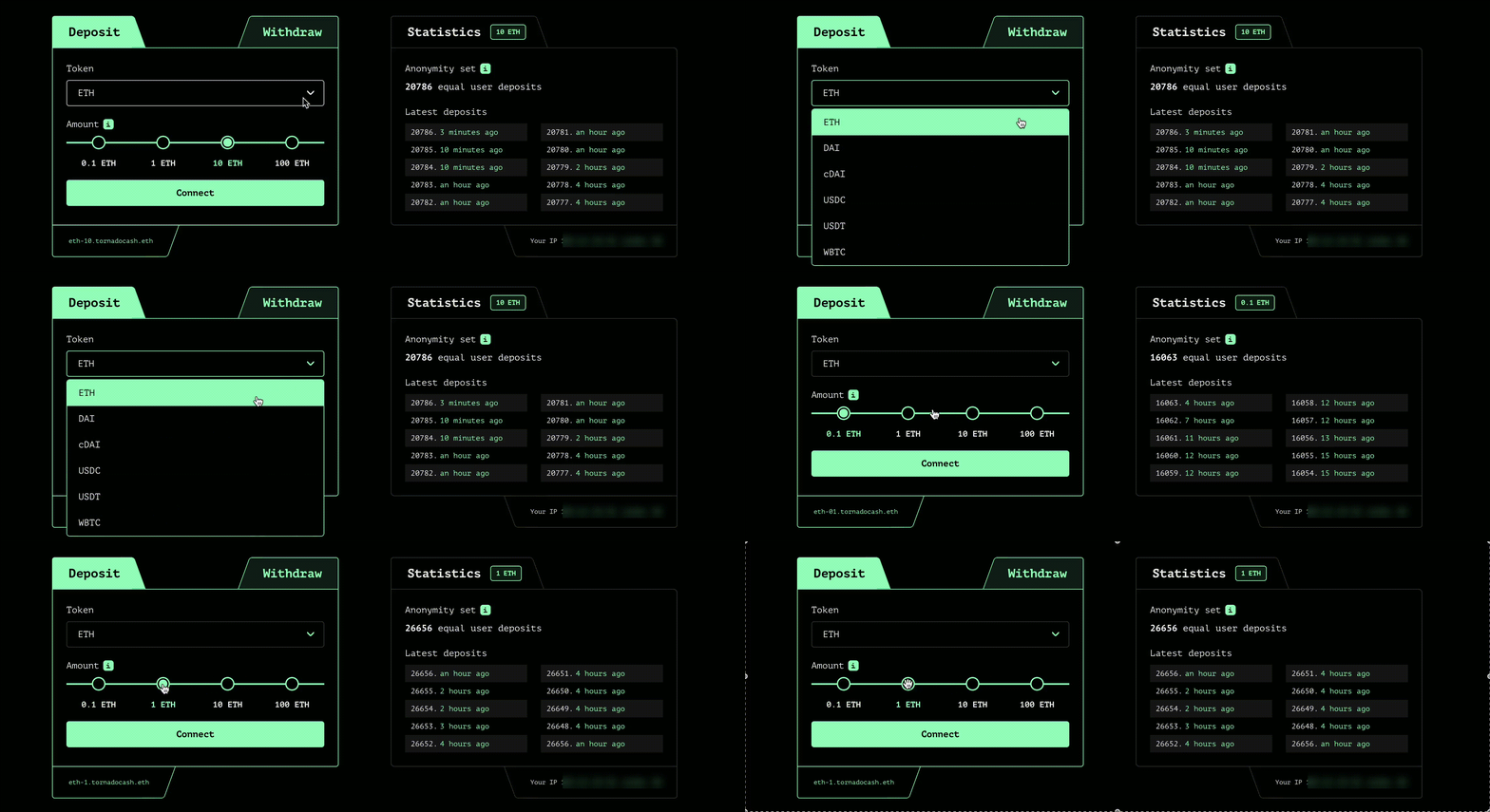
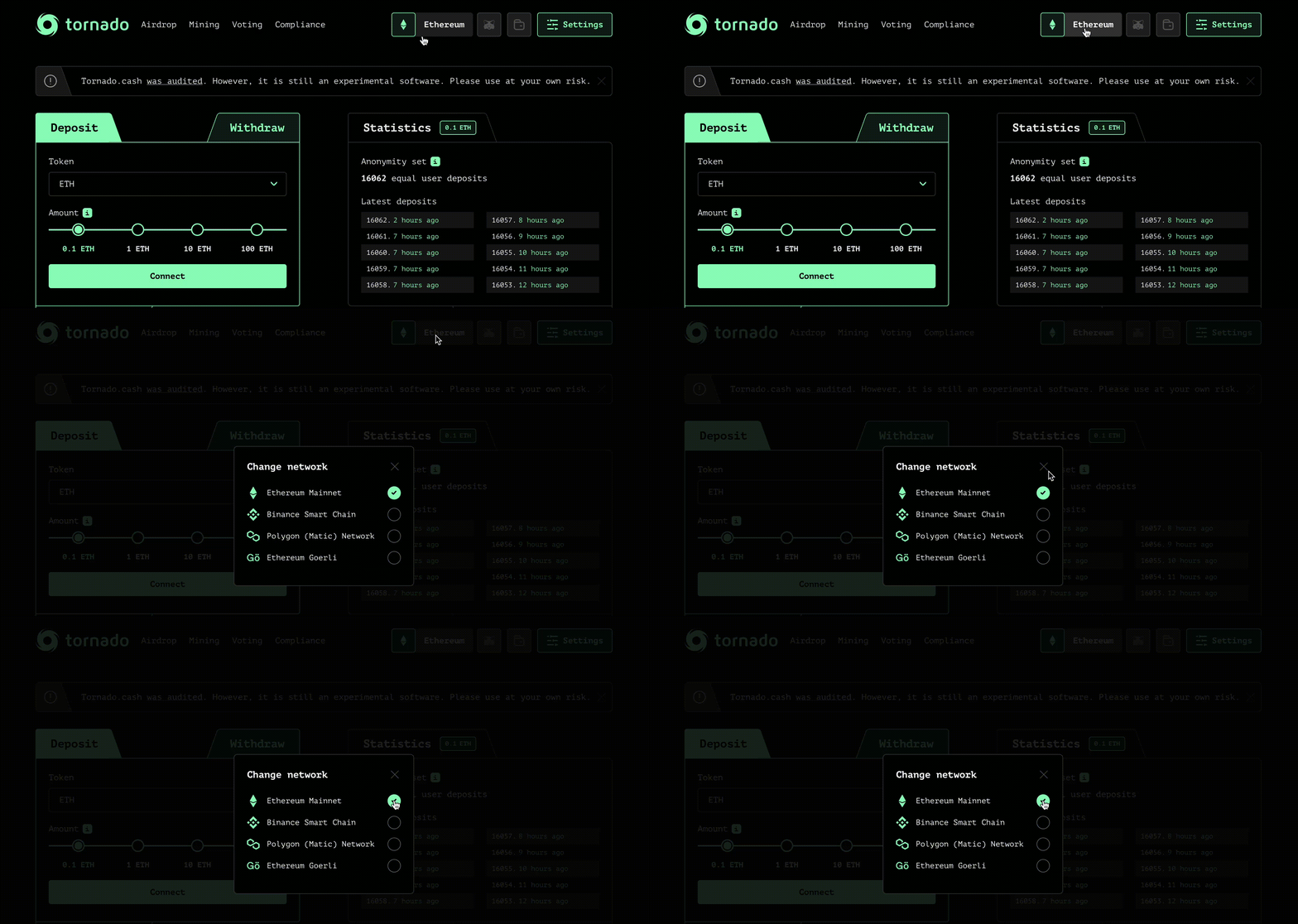 ### Select a token
Choose the token you want to deposit and its amount:
### Select a token
Choose the token you want to deposit and its amount:
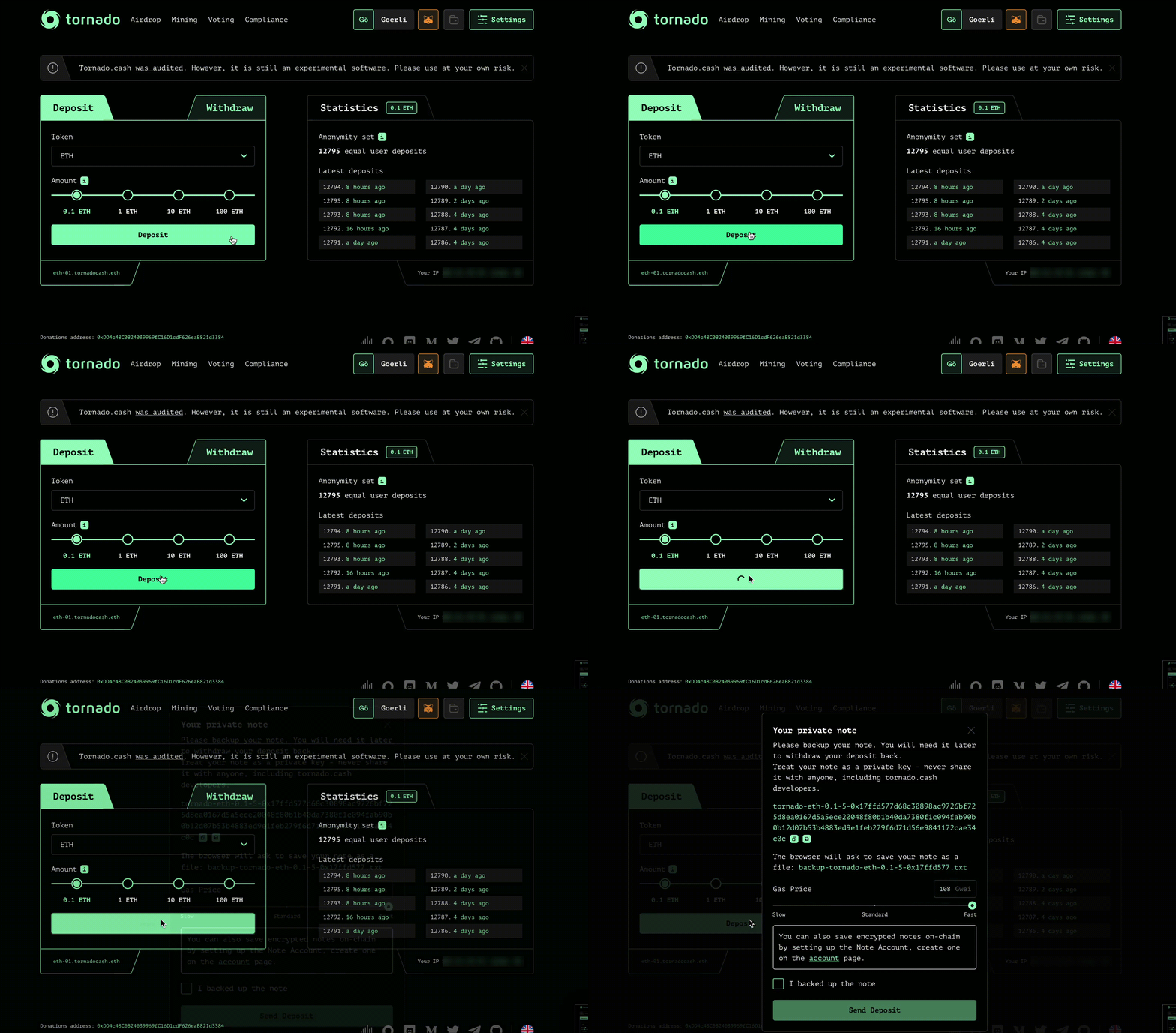
 ### Connect your wallet
Click on `Connect` and choose between wallet providers such as Metamask or WalletConnect.
### Save your note
Click on `Deposit` and store your note on a secure place before clicking on `I backed up the note`. You can also save encrypted notes on-chain by setting up a Note Account, by clicking on `Settings` (top-right corner).
### Connect your wallet
Click on `Connect` and choose between wallet providers such as Metamask or WalletConnect.
### Save your note
Click on `Deposit` and store your note on a secure place before clicking on `I backed up the note`. You can also save encrypted notes on-chain by setting up a Note Account, by clicking on `Settings` (top-right corner).
 ### Be patient
As explained [here](https://tornadoeth.cash), the longer you wait, the greater your anonymity set will be.Congrats ! You did it. Now your tokens are on the Tornado.Cash pool.
## Withdraw
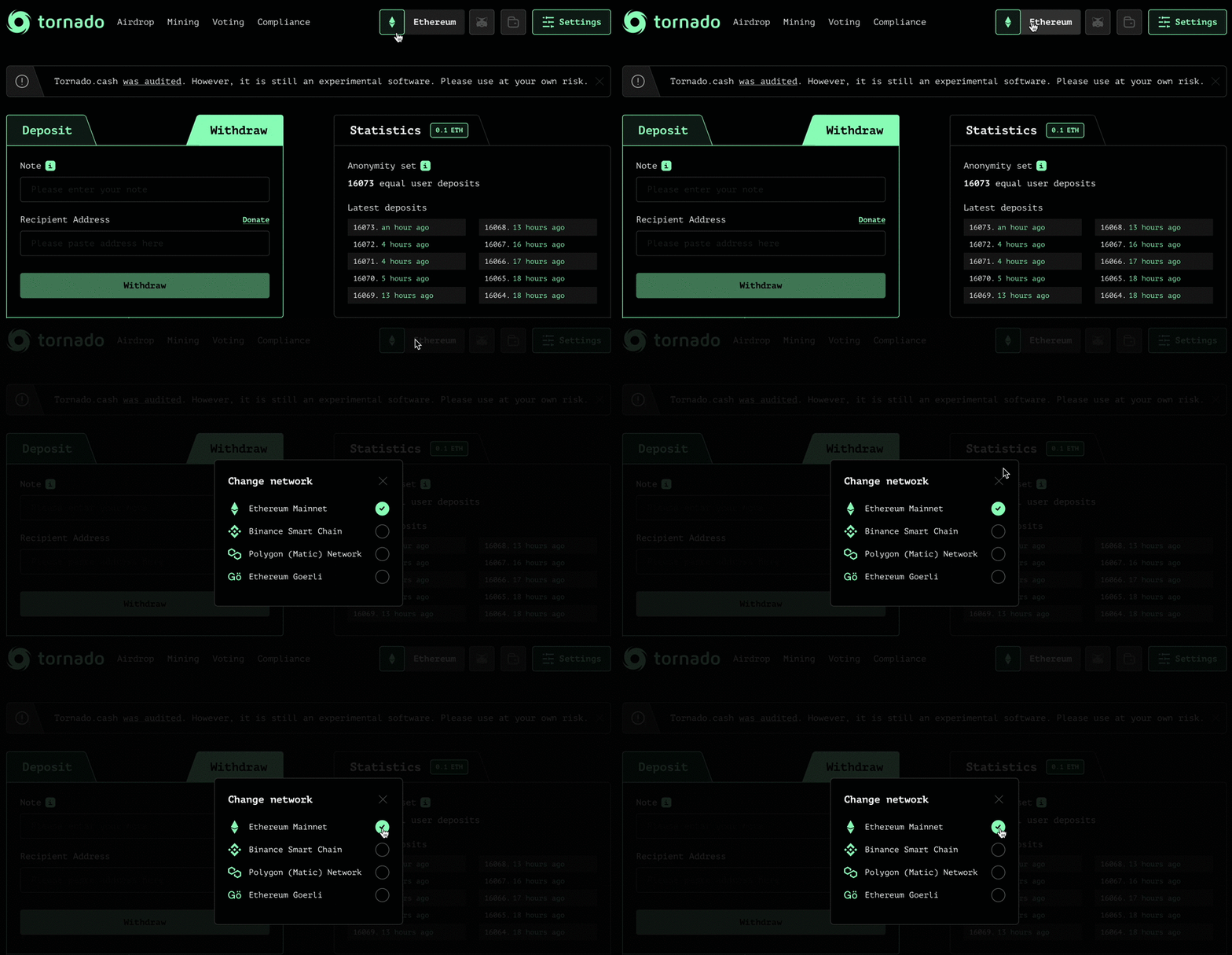
### Choose a chain
[Tornado cash](https://tornadoeth.cash) is available on several blockchains, so you will have to choose among 4 chains:
### Be patient
As explained [here](https://tornadoeth.cash), the longer you wait, the greater your anonymity set will be.Congrats ! You did it. Now your tokens are on the Tornado.Cash pool.
## Withdraw
### Choose a chain
[Tornado cash](https://tornadoeth.cash) is available on several blockchains, so you will have to choose among 4 chains:
 ### Paste your note
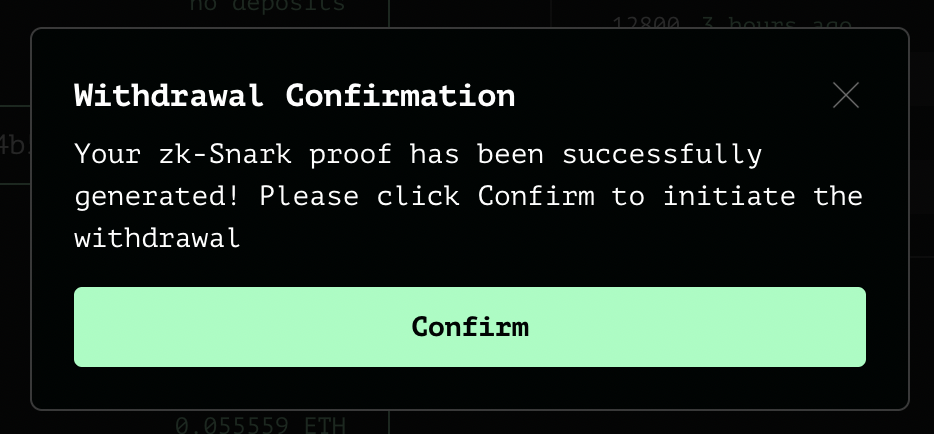
Use your deposit note by pasting it in the corresponding box. Click on `Withdraw` and wait for the zk-Snark proof to be generated.
### Confirm the withdrawal
### Paste your note
Use your deposit note by pasting it in the corresponding box. Click on `Withdraw` and wait for the zk-Snark proof to be generated.
### Confirm the withdrawal
 Done !
# Anonymity Mining
Discover how Tornado Cash Classic enables Anonymity Mining for private transactions. Learn the key steps and benefits of preserving financial privacy
Done !
# Anonymity Mining
Discover how Tornado Cash Classic enables Anonymity Mining for private transactions. Learn the key steps and benefits of preserving financial privacy


 ## How To Use the Compliance Tool?
With each deposit made through the [Tornado.Cash app](https://tornadoeth.cash/), a new Note is generated by the protocol. This Note is necessary to withdraw the deposited assets later on any withdrawal address. It is this same Note that, if needed, allow users to generate a Compliance Report to prove the origin of their assets.
*More information about how to deposit & withdraw assets on Tornado.Cash are available on:* [*Deposit & Withdraw*](/tornado-cash-classic/deposit-and-withdraw)*.*
To get a Compliance Report, the user solely need to copy the Note, generated after the deposit, in the dedicated box.
### Before Withdrawal
If the Note wasn't spent yet (i.e. assets have still not been withdrawn), the Compliance tool will only provide you with information about the deposit:
* Transaction hash of the deposit;
* The source address;
* The Commitment hash.
The commitment is the hashed random area of bytes generated at each deposit that is sent to Tornado.Cash smart contract to characterize the transaction.
## How To Use the Compliance Tool?
With each deposit made through the [Tornado.Cash app](https://tornadoeth.cash/), a new Note is generated by the protocol. This Note is necessary to withdraw the deposited assets later on any withdrawal address. It is this same Note that, if needed, allow users to generate a Compliance Report to prove the origin of their assets.
*More information about how to deposit & withdraw assets on Tornado.Cash are available on:* [*Deposit & Withdraw*](/tornado-cash-classic/deposit-and-withdraw)*.*
To get a Compliance Report, the user solely need to copy the Note, generated after the deposit, in the dedicated box.
### Before Withdrawal
If the Note wasn't spent yet (i.e. assets have still not been withdrawn), the Compliance tool will only provide you with information about the deposit:
* Transaction hash of the deposit;
* The source address;
* The Commitment hash.
The commitment is the hashed random area of bytes generated at each deposit that is sent to Tornado.Cash smart contract to characterize the transaction.
 *You can find more information about how Tornado.Cash achieve to provide privacy by reading* [*How does Tornado.Cash work?*](/generals/how-does-tornado-cash-work)*.*
### After Withdrawal
If the Note was spent (i.e. assets were withdrawn to a given address using the Note), the Compliance Tool will complete the information above by adding:
* Transaction hash of the withdrawal;
* The destination address;
* The Nullifier Hash.
The nullifier hash is a public input that is sent on-chain to get checked with the smart contract & the Merkle tree data to allow the withdrawal.
*You can find more information about how Tornado.Cash achieve to provide privacy by reading* [*How does Tornado.Cash work?*](/generals/how-does-tornado-cash-work)*.*
### After Withdrawal
If the Note was spent (i.e. assets were withdrawn to a given address using the Note), the Compliance Tool will complete the information above by adding:
* Transaction hash of the withdrawal;
* The destination address;
* The Nullifier Hash.
The nullifier hash is a public input that is sent on-chain to get checked with the smart contract & the Merkle tree data to allow the withdrawal.
 Therefore, the tool allows users to re-link source & destination addresses in order to prove transaction history for assets used on Tornado.Cash.
This information can also be downloaded under a PDF format, making it is easier to get sent to any desired third part:
Therefore, the tool allows users to re-link source & destination addresses in order to prove transaction history for assets used on Tornado.Cash.
This information can also be downloaded under a PDF format, making it is easier to get sent to any desired third part:
 # Circuits
Explore Tornado Cash Classic circuits to enhance your privacy and security in transactions. Learn how to use and configure with ease
Behind the Tornado.cash front-end sits a number of [Circom](https://docs.circom.io/) circuits, which enable the fundamental privacy guarantees that Tornado.cash users enjoy. These circuits implement the [Zero Knowledge protocol](https://en.wikipedia.org/wiki/Zero-knowledge_proof) that Tornado.cash's smart contracts interface with to prove claims about a user's deposit, such as that it is valid, that is hasn't already been withdrawn, and in the context of Anonymity Mining, the number of blocks that exist between a note's deposit transaction and its withdrawal.
### How ZK Circuits Work
#### SNARKs and GROTH16
Before trying to understand how Tornado.cash works under the hood, you first need to understand Zero Knowledge circuits, how they're constructed, and how proofs are generated client-side, then verified on-chain. While there are a [few different types](https://en.wikipedia.org/wiki/Zero-knowledge_proof#Zero_knowledge_types) of ZK systems, Tornado.cash relies upon a variant known as "succinct non-interactive arguments of knowledge" (SNARK), specifically a variant called GROTH16.
#### Circom and snarkjs
Because we're not all Vitalik, it's best if we have some simple tools that will abstract away the generation and execution of these complicated polynomial commitments. This is where [Circom](https://docs.circom.io/) and [snarkjs](https://github.com/iden3/snarkjs) come in.
Circom is easiest to think of as a compiler for a circuit language which acts very much like the kind of [hardware description language](https://en.wikipedia.org/wiki/Hardware_description_language) that electrical engineers would use to describe an electrical circuit. Except instead of an electrical circuit, we're describing an **arithmetic circuit**, which contains components, and the way that they connect together.
When you compile a Circom circuit, the resulting output is an [R1CS constraint system](https://docs.circom.io/background/background/) and a [Wasm](https://en.wikipedia.org/wiki/WebAssembly) executable that will be used to generate a [witness](https://docs.circom.io/background/background/).
**R1CS**
To understand R1CS (Rank-1 constraint system), there is of course more math. And where there's important cryptosystem math, there's a [post by Vitalik](https://medium.com/@VitalikButerin/quadratic-arithmetic-programs-from-zero-to-hero-f6d558cea649#5539).
> An R1CS is a sequence of groups of three vectors(a, b, c)(a,b,c), and the solution to an R1CS is a vectorss, wheressmust satisfy the equations . a \* s . b - s . c = 0s.a∗s.b−s.c=0, where..represents the dot product - in simpler terms, if we "zip together"aaandss, multiplying the two values in the same positions, and then take the sum of these products, then do the same tobbandssand thenccandss, then the third result equals the product of the first two results.The next step is taking this R1CS and converting it into QAP form, which implements the exact same logic except using polynomials instead of dot products ... instead of checking the constraints in the R1CS individually, we can now check all of the constraints at the same time by doing the dot product check on the polynomials.If we try to falsify any of the variables in the R1CS solution that we are deriving this QAP solution from - say, set the last one to 31 instead of 30, then we get attpolynomial that fails one of the checks.
In short, the R1CS is a set of polynomial constraints which any proof generated by the circuit must satisfy. These constraints are [generated by Circom](https://docs.circom.io/circom-language/constraint-generation/) based on the relationship between various "signals" and operations in your circuit design.
**Witnesses**
Now, depending on what you're using Tornado.cash for, you might not want any witnesses. However, don't worry, if everything is working correctly, all of the witnesses to your interactions with Tornado.cash will be aggressively compacted, and their bodies disposed of as you please.
In the context of a SNARK circuit, a witness is the set of values that need to be generated from the inputs to the circuit, based on the circuit design, to satisfy all of the constraints imposed by the circuit. You can think of the witness generator produced by Circom as a circuit-specific decompression function which runs your inputs through the circuit, and snapshots all of the various intermediate values that are produced along the way.
With this expanded form generated from your inputs, you know which values must be assigned to the constraints specified by the R1CS in order to construct a valid proof.
**Proof**
When you think of a "proof", you probably imagine that it's an incontrovertible guarantee that something is true. However, in the context of a SNARK, a "proof" actually represents an *argument* that something is *almost certainly* true. If we were to try to transmit the solution to every single polynomial constraint imposed by a circuit, we would end up with proofs that were orders of magnitude larger than if we simply show that certain sorts of relationships hold true between the intermediate state values within the circuit.
It's possible that for any given circuit, someone with sufficient computing power could generate a proof that satisfies the circuit's constraints in a malformed way, but this would be roughly equivalent in difficulty to [factoring large primes](https://en.wikipedia.org/wiki/RSA_Factoring_Challenge).
So, when generating a proof for a SNARK circuit, you're calculating the intermediate states of your circuit for a given input (witness generation), and then calculating the relationships between your inputs, the intermediate states, and the circuit's outputs.
Once you have the proof that you've satisfied the necessary set of constraints, you can then publish that proof and some subset of your inputs and outputs (a.k.a. public signals). Knowing the R1CS, your public signals, your proof, and the circuit's proving key, anyone can then verify that your proof satisfies the R1CS, and that your public signals are what would be expected to correspond to your proof.
### Circuits
With that understanding of ZK proving circuits well-in-hand, let's delve into how Tornado.cash uses some relatively simple circuits to enable you to privately and permissionlessly obscure the relationship between your deposit and withdrawal transactions on a public blockchain network, and then to later prove things *about* the relationship between your deposit and withdrawal (e.g. how long you waited before withdrawing).
[Tornado.cash](https://tornadoeth.cash) is best understood as having two separate major components.
#### Core Deposit Circuit
The core deposit circuit is what most users interact with, proving that a user has created a commitment representing the deposit of some corresponding asset denomination, that they haven't yet withdrawn that asset, and that they know the secret that they supplied when generating the initial commitment.
[Core Deposit Circuit](#core-deposit-circuit)
#### Anonymity Mining
The anonymity mining circuits form the basis for the Anonymity Mining program, which incentivizes users to leave their deposits in the contract for longer periods of time, so as to ensure that the Tornado.cash deposit pools maintain a large number of active deposits (thus increasing [k-anonymity](https://en.wikipedia.org/wiki/K-anonymity) for other users).
# Core Deposit Circuit
Discover the Core Deposit Circuit of Tornado Cash Classic. Learn how it enhances privacy and security in decentralized finance
The core deposit circuit is what most users interact with, proving that a user has created a commitment representing the deposit of some corresponding asset denomination, that they haven't yet withdrawn that asset, and that they know the secret that they supplied when generating the initial commitment.
## Making a Deposit
A deposit into Tornado.cash is a very simple operation, which doesn't actually involve any ZK proofs. At least not yet. To make a deposit, you invoke the `deposit` method of a [Tornado contract](https://github.com/tornadocashdev/tornado-core/blob/master/contracts/Tornado.sol) instance, supplying a Pedersen Commitment, along with the asset denomination that you're depositing. This commitment is inserted into a specialized Merkle Tree, where the structure of the Merkle Tree is aligned to an elliptic curve associated with a prime in the order of the BN128 elliptic curve, and the labels of the tree are computed using MiMC hashing.
### Commitment Scheme
When you make a "commitment" in the context of cryptography, what you're doing is taking a secret value - often large and random - and running it through some cryptographic function (e.g. a hash function), then disclosing the result. Later, when you need to make good on the commitment, you prove that you know the original secret value.
### Pedersen Hash
A Pedersen Hash is an extremely specialized hashing function that is particularly well-suited for use in applications leveraging Zero Knowledge proving circuits. Where other hashing functions like SHA-256 are designed to exhibit properties such as producing very different outputs for even slightly different inputs (the avalanche effect), Pedersen hashing instead prioritizes the ability to compute the hash extremely efficiently in Zero Knowledge circuits.
Hashing a message with Pedersen compresses the bits of the message down to a point along an elliptic curve called Baby Jubjub. Baby Jubjub is in the order of the BN128 elliptic curve that is supported by precompiled operations on the Ethereum network which were added in EIP-196. This means that operations that use the Baby Jubjub curve, such as Pedersen Hashing, are highly gas-efficient.
When you compute the Pedersen hash of a message, the resulting point along the its elliptic curve is very efficient to verify, but infeasible to reverse back into the original message.
### Tornado Commitment
To generate a commitment for a Tornado.cash deposit, you first generate two large random integers, each 31 bytes in length. The first value is a nullifier that you will later disclose in order to withdraw your deposit, and the second is a secret that secures the confidential relationship between your deposit and withdrawal.
The preimage of your deposit note is the concatenation of these two values (`nullifier` + `secret`), resulting in a message 62 bytes in length. This message is Pedersen hashed, resulting in an output representing an element of the Baby Jubjub elliptic curve encoded as a 32-byte big-endian integer.
If you want to see this in code form, you can reference the [tornado-cli deposit function](https://github.com/tornadocashdev/tornado-cli/blob/master/cli.js#L53-L112).
### MiMC Merkle Tree
The [Tornado contract](https://github.com/tornadocashdev/tornado-core/blob/master/contracts/Tornado.sol) is a specialized Merkle Tree which labels its nodes using MiMC hashes.
For those not familiar with Merkle Trees, they are binary trees where each non-leaf node is labelled with the hash of the labels of its child nodes, and the leaf nodes are labelled with the hash of their data. Ordinarily, Merkle Trees use a one-way cryptographic hashing function like SHA-2, but in this case, we're using MiMC, which has some useful properties.
One of the useful properties of MiMC is that it's well-suited to operating over prime fields, which is important to us because Zero Knowledge proofs are fundamentally based on prime fields, and Pedersen Hashes are points within a prime field defined by the Baby Jubjub elliptic curve - which is in turn within the order of the BN128 curve supported natively on Ethereum. Because Zero Knowledge proofs are operationally expensive, and each operation in an Ethereum transaction has a corresponding gas cost, the specific types of operations we design around need to be as gas-efficient as possible.
The other particularly useful properties of MiMC are that it's non-parallelizable, and difficult to compute but easy to verify. These properties add to the security of the contract by making it computationally infeasible to calculate a forged "commitment" which has a colliding path within the merkle tree.
### Zero Nodes
During the initialization of the Tornado Merkle Tree, a single path spanning the height of the tree is preallocated starting with a "zero leaf" node with a label of `keccak256("tornado") % FIELD_SIZE`. Each subsequent non-leaf node toward the root is then labelled as if the entire bottom of the tree were populated by that same same leaf node.
The purpose of these "zero nodes" is to ensure that all paths within the merkle tree are invalid until they terminate in a valid commitment.
### Inserting a Commitment
When you insert a commitment into the Tornado contract's merkle tree, you are replacing a "zero leaf" with a new leaf whose label is the MiMC hash of your Pedersen commitment, and then traversing up the tree updating each subsequent parent node with a new label based on the label updates that your new leaf introduces below.
Commitments are inserted from left to right within the tree, with every two commitment insertions filling a "subtree". Each insertion increments the "index" of the tree, determining whether the next commitment will be inserted on the left or right side of the entry to its merkle path.
Once your deposit has updated the tree, the label of the top-most node becomes the tree's new "root", and is added to a rolling history containing the labels of the last 100 roots, for later use in processing withdrawal transactions.
The Tornado.cash deposit contracts are deployed with 20 "levels", with each level increasing the number of potential leaves by a power of 2. That means that the contract's merkle tree supports up to 2^20 leaves, allowing for up to 1,048,576 deposits to be made into the contract before it needs to be replaced.
The reason behind this seemingly-low number of levels is that every deposit has to perform as many updates to the tree as there are levels. A tree with more levels would require more gas per deposit, as well as correspondingly larger proof sizes when withdrawing notes.
## Making a Withdrawal
Having made a deposit, you now have a set of truth claims that you can generate a proof based upon. Generally speaking, Zero Knowledge proofs are anchored to some value(s) known by both the prover and the verifier, to which a relationship is going to be proven to a set of values known only by the prover. The circuit verifier can confirm that the prover has used the value(s) that are known, and that the proof that they computed satisfies the constraints imposed by the circuit.
### Inputs to a Withdrawal Proof
In the case of Tornado.cash deposits, the prover (the person submitting a withdrawal transaction), and the verifier (the deposit contract's withdrawal method) both know a recent merkle root. The prover also supplies a set of other public inputs that they used for the generation of their proof.
#### The total set of public inputs for a withdrawal proof are:
1. 1.A recent merkle root
2. 2.The Pedersen hash of the nullifier component from their deposit commitment
3. 3.The address of the recipient of their withdrawal
4. 4.The address of the relayer that they've selected (or their own address)
5. 5.The fee that they're paying the relayer (or zero)
6. 6.The refund that they're paying the relayer (or zero)
#### The additional private inputs for a withdrawal proof are:
1. 1.The nullifier component from their deposit commitment
2. 2.The secret component from their deposit commitment
3. 3.The set of node labels that exist in the path between the root and the leaf nodes of the merkle tree
4. 4.An array of `0/1` values indicating whether each specified path element is on the left or right side of its parent node
### Proven Claims
It would be easy to miss the clever new piece of knowledge we created when we constructed and inserted our commitment into the merkle tree. You might be inclined to think that to make a withdrawal, we're simply going to prove that we know the components of the Pedersen commitment, and that the merkle tree is just an efficient way to store those commitment hashes.
What's special about this construction is that it enables us to prove not just that we know the components of a deposited commitment, but rather it enables us to prove simply that we **know the path to a commitment within the tree**, and **how to get there** starting with a commitment preimage.
If we were only to prove that we knew the preimage to a deposited hash, we would risk revealing which commitment is ours. Instead, we're not disclosing the commitment preimage, but instead we're simply proving that we have knowledge of a preimage to a commitment within the tree. Which commitment is ours remains completely indistinguishable on the withdrawal side of the circuit protocol.
### Computing the Witness
**Nullifier Hash Check**
In order to compute the witness for the withdrawal proof, our circuit first takes the private deposit commitment inputs (`nullifier` + `secret`), and runs them through a circuit component which simultaneously computes the Pedersen hash of the full commitment message, and the Pedersen hash of the nullifier alone. The circuit then compares the resulting nullifier hash to the one you supplied as a public input, and asserts their equality.
**This proves that the nullifier hash that you supplied publicly is in fact a component of your original commitment.**
**Merkle Tree Check**
Next, the circuit takes the commitment hash it has computed, the merkle root you have specified publicly, and the path elements and left/right selectors that you specified privately, as inputs to a component which checks your merkle tree path claim.
The Merkle Tree Checker starts from the bottom of the path, inputting your commitment hash and the first element of your proposed path into a Muxer. The Muxer takes a third input, which is an element from your supplied left/right directions. The Muxer component uses these directions to inform an MiMC hashing component as to the order of its inputs. If the supplied direction is 0, then the supplied path element is on the left, and your commitment hash is on the right. If the direction is 1, then the order is reversed.
The MiMC hasher outputs the resulting hash, and the Merkle Tree Checker proceeds to the next level. It repeats the last process, except this time, instead of using your commitment hash, it uses the hash of the last level. It continues to run through each level of the proposed path, until it ends up with a final hash output.
The Merkle Tree Checker compares the hash that it has computed to the public merkle root input that you supplied, and asserts their equality.
**This proves that your commitment exists within some path beneath the specified merkle root.**
**Extra Withdrawal Parameter Check**
Before finishing, the circuit takes each of the remaining four public inputs, and squares them into a public output. While this isn't strictly necessary, it creates a set of constraints within your proof that ensure that your transaction parameters can't be tampered with before your withdrawal transaction is processed. If any of those parameters were to change, your proof would no longer be valid.
### Computing the Proof
Now that we have a witness for our proof, we take those witnessed state values and input them into the R1CS corresponding to the Withdrawal circuit, and run the prover over it. Out of the prover comes two proof artifacts. The first is the proof itself, according to the SNARK protocol we're using, and the second is the set of public inputs and outputs corresponding to that proof.
### Completing a Withdrawal Transaction
With the withdrawal proof now generated, you supply that proof, along with its public inputs, to the `withdraw` method of the deposit contract. This method verifies that:
1. 1.The specified relayer fee does not exceed the value of the denomination of asset being withdrawn
2. 2.The supplied nullifier hash has not been spent before
3. 3.The supplied merkle root is known, using the 100-root historical record
4. 4.The supplied proof is valid
One of the artifacts deployed as a dependency of the deposit contract is a Solidity contract that is generated using the proving key of the Withdrawal circuit as an input. This Verifier contract is an optimized proof verifier with a single public view function, which accepts a proof and the array of six public inputs as `uint256` values.
This function returns `TRUE` if the proof is valid according to the public inputs.
If the above preconditions are met, the supplied nullifier hash is inserted into the set of spent nullifiers, and then the value of the deposit is distributed amongst the recipient and relayer, according to the specified fee parameters.
# Logging in Tornado Cash Nova
Discover how to easily log in to Tornado Cash Nova. Step-by-step guide for secure access and optimal privacy on the platform
Launched in December 2021, Tornado Cash Nova offers the freedom to choose customized amounts for transactions, as well as the ability to transfer tokens without leaving the anonymity pool. With such unique features, this new pool requires its own set of instructions.
Tornado Cash Nova can be accessed through its own decentralized app at [nova.tornadoeth.cash](https://nova.tornadoeth.cash)
# Circuits
Explore Tornado Cash Classic circuits to enhance your privacy and security in transactions. Learn how to use and configure with ease
Behind the Tornado.cash front-end sits a number of [Circom](https://docs.circom.io/) circuits, which enable the fundamental privacy guarantees that Tornado.cash users enjoy. These circuits implement the [Zero Knowledge protocol](https://en.wikipedia.org/wiki/Zero-knowledge_proof) that Tornado.cash's smart contracts interface with to prove claims about a user's deposit, such as that it is valid, that is hasn't already been withdrawn, and in the context of Anonymity Mining, the number of blocks that exist between a note's deposit transaction and its withdrawal.
### How ZK Circuits Work
#### SNARKs and GROTH16
Before trying to understand how Tornado.cash works under the hood, you first need to understand Zero Knowledge circuits, how they're constructed, and how proofs are generated client-side, then verified on-chain. While there are a [few different types](https://en.wikipedia.org/wiki/Zero-knowledge_proof#Zero_knowledge_types) of ZK systems, Tornado.cash relies upon a variant known as "succinct non-interactive arguments of knowledge" (SNARK), specifically a variant called GROTH16.
#### Circom and snarkjs
Because we're not all Vitalik, it's best if we have some simple tools that will abstract away the generation and execution of these complicated polynomial commitments. This is where [Circom](https://docs.circom.io/) and [snarkjs](https://github.com/iden3/snarkjs) come in.
Circom is easiest to think of as a compiler for a circuit language which acts very much like the kind of [hardware description language](https://en.wikipedia.org/wiki/Hardware_description_language) that electrical engineers would use to describe an electrical circuit. Except instead of an electrical circuit, we're describing an **arithmetic circuit**, which contains components, and the way that they connect together.
When you compile a Circom circuit, the resulting output is an [R1CS constraint system](https://docs.circom.io/background/background/) and a [Wasm](https://en.wikipedia.org/wiki/WebAssembly) executable that will be used to generate a [witness](https://docs.circom.io/background/background/).
**R1CS**
To understand R1CS (Rank-1 constraint system), there is of course more math. And where there's important cryptosystem math, there's a [post by Vitalik](https://medium.com/@VitalikButerin/quadratic-arithmetic-programs-from-zero-to-hero-f6d558cea649#5539).
> An R1CS is a sequence of groups of three vectors(a, b, c)(a,b,c), and the solution to an R1CS is a vectorss, wheressmust satisfy the equations . a \* s . b - s . c = 0s.a∗s.b−s.c=0, where..represents the dot product - in simpler terms, if we "zip together"aaandss, multiplying the two values in the same positions, and then take the sum of these products, then do the same tobbandssand thenccandss, then the third result equals the product of the first two results.The next step is taking this R1CS and converting it into QAP form, which implements the exact same logic except using polynomials instead of dot products ... instead of checking the constraints in the R1CS individually, we can now check all of the constraints at the same time by doing the dot product check on the polynomials.If we try to falsify any of the variables in the R1CS solution that we are deriving this QAP solution from - say, set the last one to 31 instead of 30, then we get attpolynomial that fails one of the checks.
In short, the R1CS is a set of polynomial constraints which any proof generated by the circuit must satisfy. These constraints are [generated by Circom](https://docs.circom.io/circom-language/constraint-generation/) based on the relationship between various "signals" and operations in your circuit design.
**Witnesses**
Now, depending on what you're using Tornado.cash for, you might not want any witnesses. However, don't worry, if everything is working correctly, all of the witnesses to your interactions with Tornado.cash will be aggressively compacted, and their bodies disposed of as you please.
In the context of a SNARK circuit, a witness is the set of values that need to be generated from the inputs to the circuit, based on the circuit design, to satisfy all of the constraints imposed by the circuit. You can think of the witness generator produced by Circom as a circuit-specific decompression function which runs your inputs through the circuit, and snapshots all of the various intermediate values that are produced along the way.
With this expanded form generated from your inputs, you know which values must be assigned to the constraints specified by the R1CS in order to construct a valid proof.
**Proof**
When you think of a "proof", you probably imagine that it's an incontrovertible guarantee that something is true. However, in the context of a SNARK, a "proof" actually represents an *argument* that something is *almost certainly* true. If we were to try to transmit the solution to every single polynomial constraint imposed by a circuit, we would end up with proofs that were orders of magnitude larger than if we simply show that certain sorts of relationships hold true between the intermediate state values within the circuit.
It's possible that for any given circuit, someone with sufficient computing power could generate a proof that satisfies the circuit's constraints in a malformed way, but this would be roughly equivalent in difficulty to [factoring large primes](https://en.wikipedia.org/wiki/RSA_Factoring_Challenge).
So, when generating a proof for a SNARK circuit, you're calculating the intermediate states of your circuit for a given input (witness generation), and then calculating the relationships between your inputs, the intermediate states, and the circuit's outputs.
Once you have the proof that you've satisfied the necessary set of constraints, you can then publish that proof and some subset of your inputs and outputs (a.k.a. public signals). Knowing the R1CS, your public signals, your proof, and the circuit's proving key, anyone can then verify that your proof satisfies the R1CS, and that your public signals are what would be expected to correspond to your proof.
### Circuits
With that understanding of ZK proving circuits well-in-hand, let's delve into how Tornado.cash uses some relatively simple circuits to enable you to privately and permissionlessly obscure the relationship between your deposit and withdrawal transactions on a public blockchain network, and then to later prove things *about* the relationship between your deposit and withdrawal (e.g. how long you waited before withdrawing).
[Tornado.cash](https://tornadoeth.cash) is best understood as having two separate major components.
#### Core Deposit Circuit
The core deposit circuit is what most users interact with, proving that a user has created a commitment representing the deposit of some corresponding asset denomination, that they haven't yet withdrawn that asset, and that they know the secret that they supplied when generating the initial commitment.
[Core Deposit Circuit](#core-deposit-circuit)
#### Anonymity Mining
The anonymity mining circuits form the basis for the Anonymity Mining program, which incentivizes users to leave their deposits in the contract for longer periods of time, so as to ensure that the Tornado.cash deposit pools maintain a large number of active deposits (thus increasing [k-anonymity](https://en.wikipedia.org/wiki/K-anonymity) for other users).
# Core Deposit Circuit
Discover the Core Deposit Circuit of Tornado Cash Classic. Learn how it enhances privacy and security in decentralized finance
The core deposit circuit is what most users interact with, proving that a user has created a commitment representing the deposit of some corresponding asset denomination, that they haven't yet withdrawn that asset, and that they know the secret that they supplied when generating the initial commitment.
## Making a Deposit
A deposit into Tornado.cash is a very simple operation, which doesn't actually involve any ZK proofs. At least not yet. To make a deposit, you invoke the `deposit` method of a [Tornado contract](https://github.com/tornadocashdev/tornado-core/blob/master/contracts/Tornado.sol) instance, supplying a Pedersen Commitment, along with the asset denomination that you're depositing. This commitment is inserted into a specialized Merkle Tree, where the structure of the Merkle Tree is aligned to an elliptic curve associated with a prime in the order of the BN128 elliptic curve, and the labels of the tree are computed using MiMC hashing.
### Commitment Scheme
When you make a "commitment" in the context of cryptography, what you're doing is taking a secret value - often large and random - and running it through some cryptographic function (e.g. a hash function), then disclosing the result. Later, when you need to make good on the commitment, you prove that you know the original secret value.
### Pedersen Hash
A Pedersen Hash is an extremely specialized hashing function that is particularly well-suited for use in applications leveraging Zero Knowledge proving circuits. Where other hashing functions like SHA-256 are designed to exhibit properties such as producing very different outputs for even slightly different inputs (the avalanche effect), Pedersen hashing instead prioritizes the ability to compute the hash extremely efficiently in Zero Knowledge circuits.
Hashing a message with Pedersen compresses the bits of the message down to a point along an elliptic curve called Baby Jubjub. Baby Jubjub is in the order of the BN128 elliptic curve that is supported by precompiled operations on the Ethereum network which were added in EIP-196. This means that operations that use the Baby Jubjub curve, such as Pedersen Hashing, are highly gas-efficient.
When you compute the Pedersen hash of a message, the resulting point along the its elliptic curve is very efficient to verify, but infeasible to reverse back into the original message.
### Tornado Commitment
To generate a commitment for a Tornado.cash deposit, you first generate two large random integers, each 31 bytes in length. The first value is a nullifier that you will later disclose in order to withdraw your deposit, and the second is a secret that secures the confidential relationship between your deposit and withdrawal.
The preimage of your deposit note is the concatenation of these two values (`nullifier` + `secret`), resulting in a message 62 bytes in length. This message is Pedersen hashed, resulting in an output representing an element of the Baby Jubjub elliptic curve encoded as a 32-byte big-endian integer.
If you want to see this in code form, you can reference the [tornado-cli deposit function](https://github.com/tornadocashdev/tornado-cli/blob/master/cli.js#L53-L112).
### MiMC Merkle Tree
The [Tornado contract](https://github.com/tornadocashdev/tornado-core/blob/master/contracts/Tornado.sol) is a specialized Merkle Tree which labels its nodes using MiMC hashes.
For those not familiar with Merkle Trees, they are binary trees where each non-leaf node is labelled with the hash of the labels of its child nodes, and the leaf nodes are labelled with the hash of their data. Ordinarily, Merkle Trees use a one-way cryptographic hashing function like SHA-2, but in this case, we're using MiMC, which has some useful properties.
One of the useful properties of MiMC is that it's well-suited to operating over prime fields, which is important to us because Zero Knowledge proofs are fundamentally based on prime fields, and Pedersen Hashes are points within a prime field defined by the Baby Jubjub elliptic curve - which is in turn within the order of the BN128 curve supported natively on Ethereum. Because Zero Knowledge proofs are operationally expensive, and each operation in an Ethereum transaction has a corresponding gas cost, the specific types of operations we design around need to be as gas-efficient as possible.
The other particularly useful properties of MiMC are that it's non-parallelizable, and difficult to compute but easy to verify. These properties add to the security of the contract by making it computationally infeasible to calculate a forged "commitment" which has a colliding path within the merkle tree.
### Zero Nodes
During the initialization of the Tornado Merkle Tree, a single path spanning the height of the tree is preallocated starting with a "zero leaf" node with a label of `keccak256("tornado") % FIELD_SIZE`. Each subsequent non-leaf node toward the root is then labelled as if the entire bottom of the tree were populated by that same same leaf node.
The purpose of these "zero nodes" is to ensure that all paths within the merkle tree are invalid until they terminate in a valid commitment.
### Inserting a Commitment
When you insert a commitment into the Tornado contract's merkle tree, you are replacing a "zero leaf" with a new leaf whose label is the MiMC hash of your Pedersen commitment, and then traversing up the tree updating each subsequent parent node with a new label based on the label updates that your new leaf introduces below.
Commitments are inserted from left to right within the tree, with every two commitment insertions filling a "subtree". Each insertion increments the "index" of the tree, determining whether the next commitment will be inserted on the left or right side of the entry to its merkle path.
Once your deposit has updated the tree, the label of the top-most node becomes the tree's new "root", and is added to a rolling history containing the labels of the last 100 roots, for later use in processing withdrawal transactions.
The Tornado.cash deposit contracts are deployed with 20 "levels", with each level increasing the number of potential leaves by a power of 2. That means that the contract's merkle tree supports up to 2^20 leaves, allowing for up to 1,048,576 deposits to be made into the contract before it needs to be replaced.
The reason behind this seemingly-low number of levels is that every deposit has to perform as many updates to the tree as there are levels. A tree with more levels would require more gas per deposit, as well as correspondingly larger proof sizes when withdrawing notes.
## Making a Withdrawal
Having made a deposit, you now have a set of truth claims that you can generate a proof based upon. Generally speaking, Zero Knowledge proofs are anchored to some value(s) known by both the prover and the verifier, to which a relationship is going to be proven to a set of values known only by the prover. The circuit verifier can confirm that the prover has used the value(s) that are known, and that the proof that they computed satisfies the constraints imposed by the circuit.
### Inputs to a Withdrawal Proof
In the case of Tornado.cash deposits, the prover (the person submitting a withdrawal transaction), and the verifier (the deposit contract's withdrawal method) both know a recent merkle root. The prover also supplies a set of other public inputs that they used for the generation of their proof.
#### The total set of public inputs for a withdrawal proof are:
1. 1.A recent merkle root
2. 2.The Pedersen hash of the nullifier component from their deposit commitment
3. 3.The address of the recipient of their withdrawal
4. 4.The address of the relayer that they've selected (or their own address)
5. 5.The fee that they're paying the relayer (or zero)
6. 6.The refund that they're paying the relayer (or zero)
#### The additional private inputs for a withdrawal proof are:
1. 1.The nullifier component from their deposit commitment
2. 2.The secret component from their deposit commitment
3. 3.The set of node labels that exist in the path between the root and the leaf nodes of the merkle tree
4. 4.An array of `0/1` values indicating whether each specified path element is on the left or right side of its parent node
### Proven Claims
It would be easy to miss the clever new piece of knowledge we created when we constructed and inserted our commitment into the merkle tree. You might be inclined to think that to make a withdrawal, we're simply going to prove that we know the components of the Pedersen commitment, and that the merkle tree is just an efficient way to store those commitment hashes.
What's special about this construction is that it enables us to prove not just that we know the components of a deposited commitment, but rather it enables us to prove simply that we **know the path to a commitment within the tree**, and **how to get there** starting with a commitment preimage.
If we were only to prove that we knew the preimage to a deposited hash, we would risk revealing which commitment is ours. Instead, we're not disclosing the commitment preimage, but instead we're simply proving that we have knowledge of a preimage to a commitment within the tree. Which commitment is ours remains completely indistinguishable on the withdrawal side of the circuit protocol.
### Computing the Witness
**Nullifier Hash Check**
In order to compute the witness for the withdrawal proof, our circuit first takes the private deposit commitment inputs (`nullifier` + `secret`), and runs them through a circuit component which simultaneously computes the Pedersen hash of the full commitment message, and the Pedersen hash of the nullifier alone. The circuit then compares the resulting nullifier hash to the one you supplied as a public input, and asserts their equality.
**This proves that the nullifier hash that you supplied publicly is in fact a component of your original commitment.**
**Merkle Tree Check**
Next, the circuit takes the commitment hash it has computed, the merkle root you have specified publicly, and the path elements and left/right selectors that you specified privately, as inputs to a component which checks your merkle tree path claim.
The Merkle Tree Checker starts from the bottom of the path, inputting your commitment hash and the first element of your proposed path into a Muxer. The Muxer takes a third input, which is an element from your supplied left/right directions. The Muxer component uses these directions to inform an MiMC hashing component as to the order of its inputs. If the supplied direction is 0, then the supplied path element is on the left, and your commitment hash is on the right. If the direction is 1, then the order is reversed.
The MiMC hasher outputs the resulting hash, and the Merkle Tree Checker proceeds to the next level. It repeats the last process, except this time, instead of using your commitment hash, it uses the hash of the last level. It continues to run through each level of the proposed path, until it ends up with a final hash output.
The Merkle Tree Checker compares the hash that it has computed to the public merkle root input that you supplied, and asserts their equality.
**This proves that your commitment exists within some path beneath the specified merkle root.**
**Extra Withdrawal Parameter Check**
Before finishing, the circuit takes each of the remaining four public inputs, and squares them into a public output. While this isn't strictly necessary, it creates a set of constraints within your proof that ensure that your transaction parameters can't be tampered with before your withdrawal transaction is processed. If any of those parameters were to change, your proof would no longer be valid.
### Computing the Proof
Now that we have a witness for our proof, we take those witnessed state values and input them into the R1CS corresponding to the Withdrawal circuit, and run the prover over it. Out of the prover comes two proof artifacts. The first is the proof itself, according to the SNARK protocol we're using, and the second is the set of public inputs and outputs corresponding to that proof.
### Completing a Withdrawal Transaction
With the withdrawal proof now generated, you supply that proof, along with its public inputs, to the `withdraw` method of the deposit contract. This method verifies that:
1. 1.The specified relayer fee does not exceed the value of the denomination of asset being withdrawn
2. 2.The supplied nullifier hash has not been spent before
3. 3.The supplied merkle root is known, using the 100-root historical record
4. 4.The supplied proof is valid
One of the artifacts deployed as a dependency of the deposit contract is a Solidity contract that is generated using the proving key of the Withdrawal circuit as an input. This Verifier contract is an optimized proof verifier with a single public view function, which accepts a proof and the array of six public inputs as `uint256` values.
This function returns `TRUE` if the proof is valid according to the public inputs.
If the above preconditions are met, the supplied nullifier hash is inserted into the set of spent nullifiers, and then the value of the deposit is distributed amongst the recipient and relayer, according to the specified fee parameters.
# Logging in Tornado Cash Nova
Discover how to easily log in to Tornado Cash Nova. Step-by-step guide for secure access and optimal privacy on the platform
Launched in December 2021, Tornado Cash Nova offers the freedom to choose customized amounts for transactions, as well as the ability to transfer tokens without leaving the anonymity pool. With such unique features, this new pool requires its own set of instructions.
Tornado Cash Nova can be accessed through its own decentralized app at [nova.tornadoeth.cash](https://nova.tornadoeth.cash)
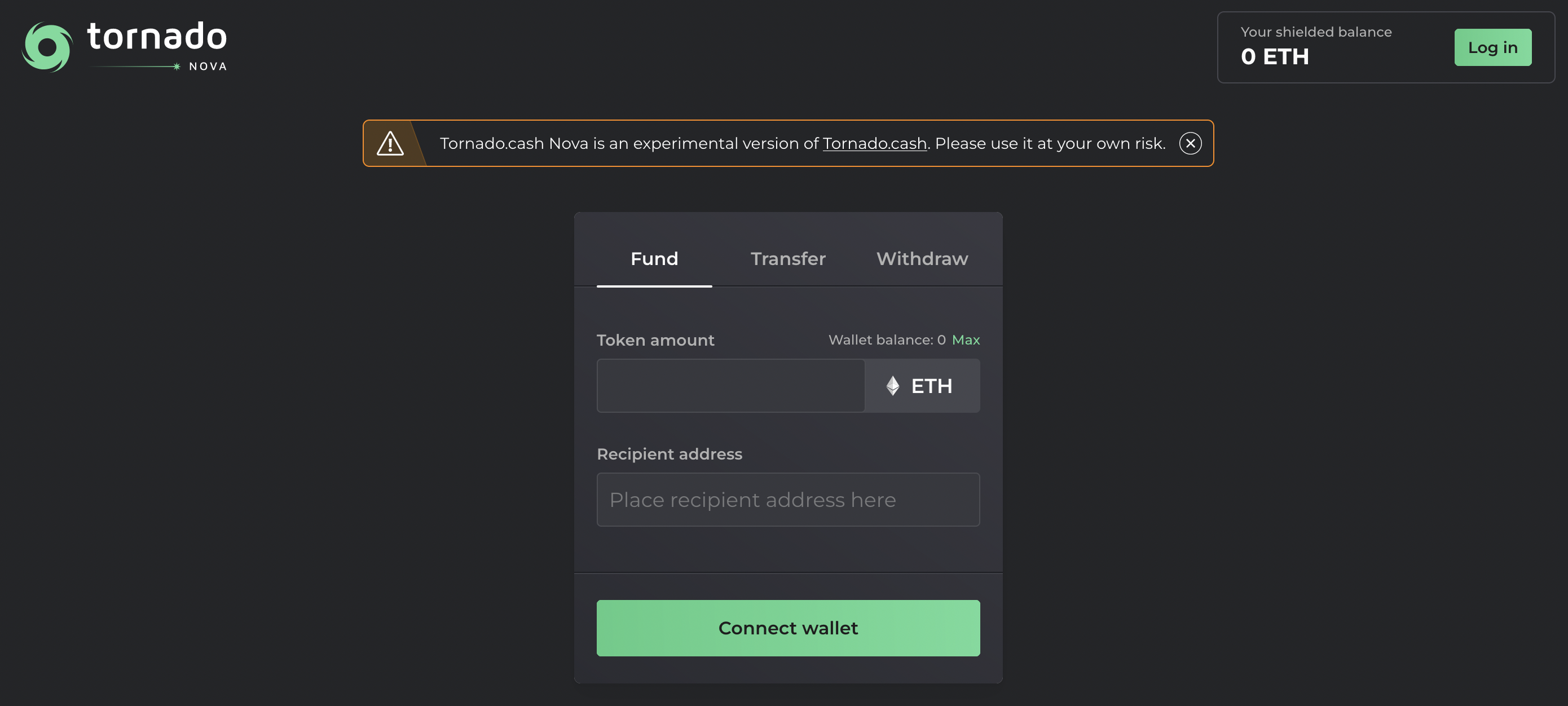 First of all, welcome to Tornado Cash Nova pool & let’s discover how this brand new tool functions 🌪
## Log In
First of all, welcome to Tornado Cash Nova pool & let’s discover how this brand new tool functions 🌪
## Log In
 You can log into your Tornado Cash Nova account either by:
* **connecting the MetaMask Wallet** with the address linked to your Nova account,
* **using the Shielded Key** that was generated alongside the creation of your account.
Each account is connected to a unique **shielded address** (as well as a unique **shielded key**) that can both be used to log in & manage your balance within the Nova pool.
### Tornado Cash Nova Account
Logging into the Nova pool will allow you to:
* **check your shielded balance** which represents the amount of tokens currently owned in the [Nova](https://nova.tornadoeth.cash) pool,
* **fund your balance** with further tokens,
* **transfer the custody of tokens** to another shielded address registered to the pool,
* **withdraw any desired amount of tokens** through the destination address of your chosing.
Only those who have access to your Metamask wallet or to your Shielded key will be able to access these informations regarding your account (i.e. your shielded balance). ⚠ Be aware of which information you share with whom.
### MetaMask Wallet
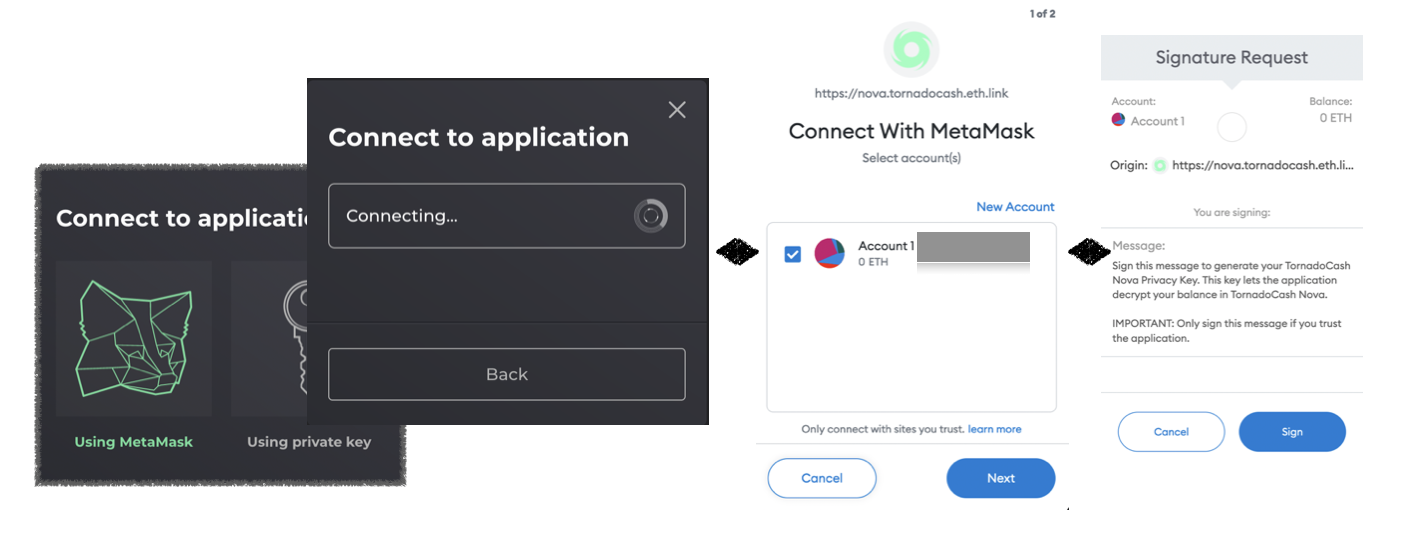
Each Tornado Cash Nova account is linked to a shielded address. As mentionned above, users have two ways to access their account & its balance. One of these ways is **through a MetaMask wallet connected to the appropriate shielded address**.
You can log into your Tornado Cash Nova account either by:
* **connecting the MetaMask Wallet** with the address linked to your Nova account,
* **using the Shielded Key** that was generated alongside the creation of your account.
Each account is connected to a unique **shielded address** (as well as a unique **shielded key**) that can both be used to log in & manage your balance within the Nova pool.
### Tornado Cash Nova Account
Logging into the Nova pool will allow you to:
* **check your shielded balance** which represents the amount of tokens currently owned in the [Nova](https://nova.tornadoeth.cash) pool,
* **fund your balance** with further tokens,
* **transfer the custody of tokens** to another shielded address registered to the pool,
* **withdraw any desired amount of tokens** through the destination address of your chosing.
Only those who have access to your Metamask wallet or to your Shielded key will be able to access these informations regarding your account (i.e. your shielded balance). ⚠ Be aware of which information you share with whom.
### MetaMask Wallet
Each Tornado Cash Nova account is linked to a shielded address. As mentionned above, users have two ways to access their account & its balance. One of these ways is **through a MetaMask wallet connected to the appropriate shielded address**.
 A shielded address is automatically created when users log in a given address, then deposit tokens to funds this address’ pool balance.
*More information about the Funding action is availaible on* [*Fund & Withdraw on Nova*](/tornado-cash-nova/fund-and-withdraw-on-nova)
However, shielded addresses can also be created from scratch as a separate action by logging in a new address with no prior link to Tornado Cash Nova, then by clicking on `Set up account`.
By confirming this action through your Metamask account, your shielded address will be crypted & created with the generation of a shielded key.
Once the account set, you will be able to receive shielded transfers of tokens from any another address registered to the pool. You will also be able to fund, transfer & withdraw tokens as you wish.
### Shielded Key
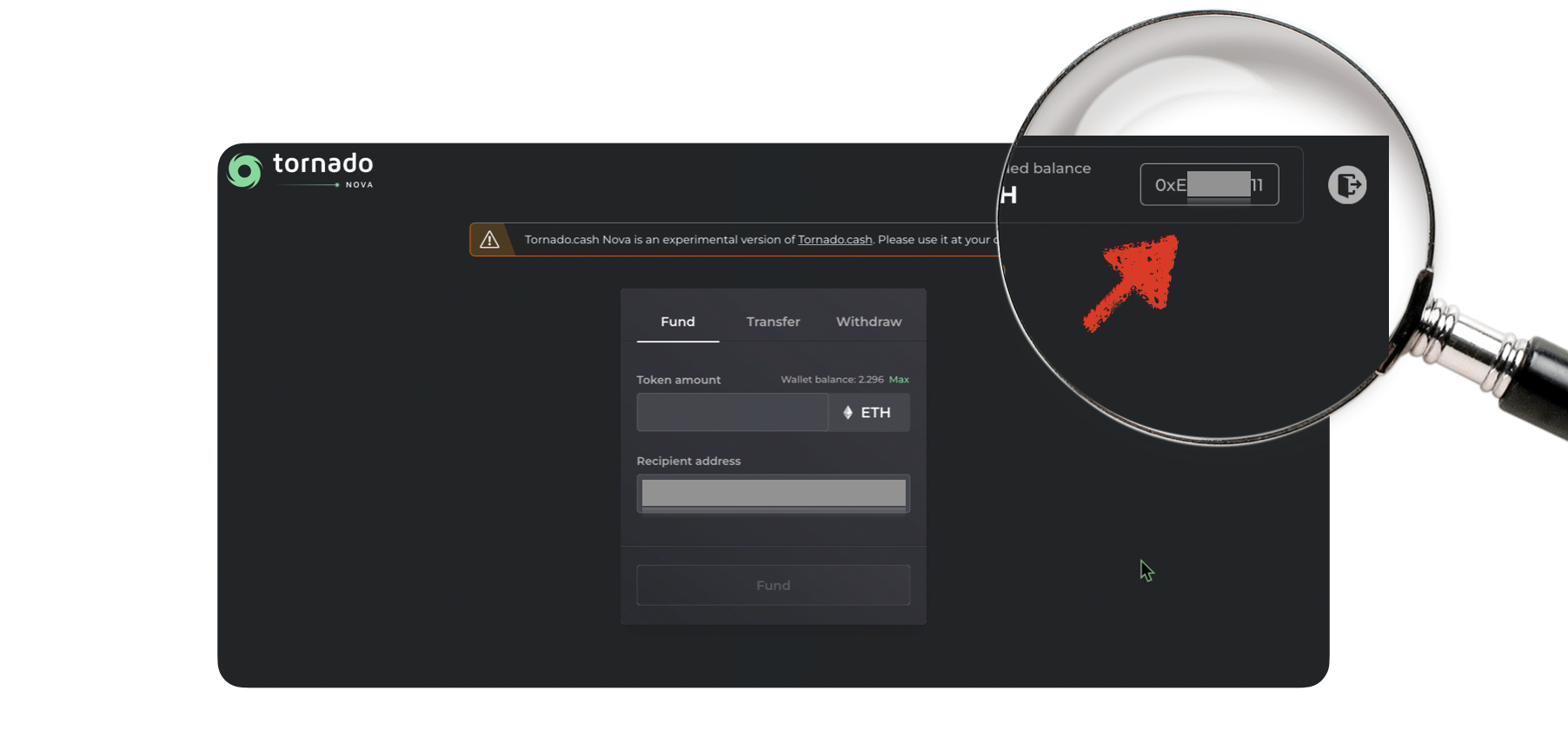
As seen above, the other way to log in is **through the generated Shielded Key** that is created when an account is created through the set up of a new shielded address.
Once you are logged in with your address & your account is set up, you can download this shielded key at any time by accessing your account data (by clicking on your address, next to your shielded balance).
A shielded address is automatically created when users log in a given address, then deposit tokens to funds this address’ pool balance.
*More information about the Funding action is availaible on* [*Fund & Withdraw on Nova*](/tornado-cash-nova/fund-and-withdraw-on-nova)
However, shielded addresses can also be created from scratch as a separate action by logging in a new address with no prior link to Tornado Cash Nova, then by clicking on `Set up account`.
By confirming this action through your Metamask account, your shielded address will be crypted & created with the generation of a shielded key.
Once the account set, you will be able to receive shielded transfers of tokens from any another address registered to the pool. You will also be able to fund, transfer & withdraw tokens as you wish.
### Shielded Key
As seen above, the other way to log in is **through the generated Shielded Key** that is created when an account is created through the set up of a new shielded address.
Once you are logged in with your address & your account is set up, you can download this shielded key at any time by accessing your account data (by clicking on your address, next to your shielded balance).
 To obtain full privacy, the same good practices that were recommended for traditional Tornado Cash pools are still required. *You can find guidelines to maintain privacy in the protocol’s documentation:* [*Tips to remain anonymous*](/generals/tips-to-remain-anonymous) *&* [*More anonymity tips*](/tornado-cash-nova/more-anonymity-tips)*.*
# Fund & withdraw on Nova
Learn how to fund and withdraw on Tornado Cash Nova. Step-by-step guide to secure transactions and privacy protection
Tornado Cash works by breaking the on-chain link between source & destination addresses. To do so, the protocol needs tokens to be deposited in a pool from one address, then to be withdrawn through another address.This principle remains the same for Tornado Cash Nova. As for traditional fixed amount pools, these two actions are core to the efficiency of the tool:
* The Funding process,
* The Withdrawing process.
## Funding Process
The great novelty compared to traditional Tornado Cash pools is that **deposited amounts are no longer predefined.** Users can choose a customized amount within the capacity of their wallet balance.
Therefore, if you want to put 0.4 ETH in the pool, you can do it all at once rather than making four separate transactions with the traditional 0.1 ETH pool.
To obtain full privacy, the same good practices that were recommended for traditional Tornado Cash pools are still required. *You can find guidelines to maintain privacy in the protocol’s documentation:* [*Tips to remain anonymous*](/generals/tips-to-remain-anonymous) *&* [*More anonymity tips*](/tornado-cash-nova/more-anonymity-tips)*.*
# Fund & withdraw on Nova
Learn how to fund and withdraw on Tornado Cash Nova. Step-by-step guide to secure transactions and privacy protection
Tornado Cash works by breaking the on-chain link between source & destination addresses. To do so, the protocol needs tokens to be deposited in a pool from one address, then to be withdrawn through another address.This principle remains the same for Tornado Cash Nova. As for traditional fixed amount pools, these two actions are core to the efficiency of the tool:
* The Funding process,
* The Withdrawing process.
## Funding Process
The great novelty compared to traditional Tornado Cash pools is that **deposited amounts are no longer predefined.** Users can choose a customized amount within the capacity of their wallet balance.
Therefore, if you want to put 0.4 ETH in the pool, you can do it all at once rather than making four separate transactions with the traditional 0.1 ETH pool.
 ### How Does It Work?
#### **The First Deposit 💰**
* The first step is to log in Tornado Cash Nova through a Metamask account.
* Your account is not set yet (button `Set up account` available on the top right corner). To set up your account, you can either:
* **Click on `Set up account`**: your logged-in address will be registered to Nova without needing to deposit any tokens. This action will enable you to receive transfers or deposits within the pool from any another address.
* **Choose your logged-in address as a recepient address**: by depositing tokens into the pool, your account (with its shielded address & shielded key) will be automatically created. The deposited funds will come top up your shielded balance.
* **Choose another registered address:** tokens will be added to the shielded balance of the chosen recipient address. This recipient address needs to be a shielded address that was formerly registered to the pool.
When you log in, the `Recipient address` is filled by default with your logged-in address. You can change it depending on how you want to use the tool.
If you set a new account, you will be able to log into the pool later, check your Tornado shielded balance or receive shielded transfers by using either your shielded address or shielded key.
*All information about how to use these elements to log in or where to find your shielded key are available on* [Logging in Tornado Cash Nova*.*](https://nova.tornadoeth.cash)
#### **The following deposits 💸**
The following deposits answer to the same rules that the first one, except that the account is already set.
By logging into the pool with your shielded address / key, you can deposit your chosen amounts to your chosen shielded address as you wish to.
Since it is a beta version, deposits are currently limited to 1 ETH/transaction. However, if the community wishes to increase this limit, the 1 ETH cap amount can always be changed through a governance proposal.
## Withdrawing Process
### How Does It Work?
#### **The First Deposit 💰**
* The first step is to log in Tornado Cash Nova through a Metamask account.
* Your account is not set yet (button `Set up account` available on the top right corner). To set up your account, you can either:
* **Click on `Set up account`**: your logged-in address will be registered to Nova without needing to deposit any tokens. This action will enable you to receive transfers or deposits within the pool from any another address.
* **Choose your logged-in address as a recepient address**: by depositing tokens into the pool, your account (with its shielded address & shielded key) will be automatically created. The deposited funds will come top up your shielded balance.
* **Choose another registered address:** tokens will be added to the shielded balance of the chosen recipient address. This recipient address needs to be a shielded address that was formerly registered to the pool.
When you log in, the `Recipient address` is filled by default with your logged-in address. You can change it depending on how you want to use the tool.
If you set a new account, you will be able to log into the pool later, check your Tornado shielded balance or receive shielded transfers by using either your shielded address or shielded key.
*All information about how to use these elements to log in or where to find your shielded key are available on* [Logging in Tornado Cash Nova*.*](https://nova.tornadoeth.cash)
#### **The following deposits 💸**
The following deposits answer to the same rules that the first one, except that the account is already set.
By logging into the pool with your shielded address / key, you can deposit your chosen amounts to your chosen shielded address as you wish to.
Since it is a beta version, deposits are currently limited to 1 ETH/transaction. However, if the community wishes to increase this limit, the 1 ETH cap amount can always be changed through a governance proposal.
## Withdrawing Process
 To withdraw funds from the Nova pool, you can either:
* choose from a set of four predetermined amounts (0.1, 0.3, 0.5 & 1 ETH),
* choose a completely customized amount by going through the button `Set custom`.
### Custom Option For Withdrawal
**The custom option should only be chosen with full knowledge of the following facts and in complete confidence in your actions.**
To maintain your privacy, choosing one of the four suggested amounts is strongly recommended as it will allow your withdrawal to blend with the crowd.
Indeed, ddepending on the chosen amount, a connection might be deduced between your initial fund transaction and your withdrawal if:
* the initially funded amount & the withdrawn amount are exactly the same,
* the funded & withdrawn amounts can be easily linked through a sum.
*For instance, a deposit of 0.42 ETH can be linked to a withdrawal of exactly 0.42 ETH or two times 0.21 ETH, which might compromise anonymity. However, with a withdrawal of 0.391 ETH, privacy is better preserved as there is no obvious link between the 0.42 & 0.391 amounts.*
### Transctions through Gnosis Chain (L2)
For cheaper transactions, Gnosis Chain (former xDAI Chain) is used as a Layer-2. To this end, a bridge is used between ETH from the Mainnet & WETH from Gnosis Chain.
Therefore, to prevent spam attacks that will overload the bridge, the withdrawal amount has to be larger than 0.05 ETH.
# Shielded transfers on Nova
Learn how to perform shielded transfers on Tornado Cash Nova for enhanced privacy and security in your transactions
One of the specificity of Tornado Cash Nova is the introduction of shielded transfers. It allows shielded transactions of deposited tokens while staying within the pool.
So far, to transfer the custody of deposited funds, tokens needed to be withdrawn first. With Nova, you will be able to transfer a chosen amount of your shielded balance (not necessarily all of it) to another address without needing to withdraw them from the pool.
To withdraw funds from the Nova pool, you can either:
* choose from a set of four predetermined amounts (0.1, 0.3, 0.5 & 1 ETH),
* choose a completely customized amount by going through the button `Set custom`.
### Custom Option For Withdrawal
**The custom option should only be chosen with full knowledge of the following facts and in complete confidence in your actions.**
To maintain your privacy, choosing one of the four suggested amounts is strongly recommended as it will allow your withdrawal to blend with the crowd.
Indeed, ddepending on the chosen amount, a connection might be deduced between your initial fund transaction and your withdrawal if:
* the initially funded amount & the withdrawn amount are exactly the same,
* the funded & withdrawn amounts can be easily linked through a sum.
*For instance, a deposit of 0.42 ETH can be linked to a withdrawal of exactly 0.42 ETH or two times 0.21 ETH, which might compromise anonymity. However, with a withdrawal of 0.391 ETH, privacy is better preserved as there is no obvious link between the 0.42 & 0.391 amounts.*
### Transctions through Gnosis Chain (L2)
For cheaper transactions, Gnosis Chain (former xDAI Chain) is used as a Layer-2. To this end, a bridge is used between ETH from the Mainnet & WETH from Gnosis Chain.
Therefore, to prevent spam attacks that will overload the bridge, the withdrawal amount has to be larger than 0.05 ETH.
# Shielded transfers on Nova
Learn how to perform shielded transfers on Tornado Cash Nova for enhanced privacy and security in your transactions
One of the specificity of Tornado Cash Nova is the introduction of shielded transfers. It allows shielded transactions of deposited tokens while staying within the pool.
So far, to transfer the custody of deposited funds, tokens needed to be withdrawn first. With Nova, you will be able to transfer a chosen amount of your shielded balance (not necessarily all of it) to another address without needing to withdraw them from the pool.

TORNADO CASH - NOVA
 ## Choice of Withdrawal Amounts
The customized amounts feature offers more flexibility & freedom of usage. However, it can compromise your privacy if used carelessly.
### Choosing predefined amounts for withdrawals
## Choice of Withdrawal Amounts
The customized amounts feature offers more flexibility & freedom of usage. However, it can compromise your privacy if used carelessly.
### Choosing predefined amounts for withdrawals
 Choosing one of the four predefined amounts is strongly recommended as it will allow your withdrawal to blend with the crowd and remain anonymous.
You still have the freedom to `Set custom` to withdraw a customized amount of you choice. However, depending on the chosen amount, a connection might be deduced between your initial fund transaction and your withdrawal if:
* the initially funded amount & the withdrawn amount are exactly the same,
* the funded & withdrawn amounts can easily be linked through a sum.
For instance, a deposit of 0.42 ETH can be linked to a withdrawal of exactly 0.42 ETH or two times 0.21 ETH, which might compromise anonymity. However, with a withdrawal of 0.391 ETH, privacy is better preserved as there is no obvious link between the 0.42 & 0.391 amounts.
The custom option should only be chosen with full knowledge of these facts and in complete confidence in your actions.
# Articles
Library of articles, videos, news report and tutorials about Tornado Cash
# Videos
Library of articles, videos, news report and tutorials about Tornado Cash
Choosing one of the four predefined amounts is strongly recommended as it will allow your withdrawal to blend with the crowd and remain anonymous.
You still have the freedom to `Set custom` to withdraw a customized amount of you choice. However, depending on the chosen amount, a connection might be deduced between your initial fund transaction and your withdrawal if:
* the initially funded amount & the withdrawn amount are exactly the same,
* the funded & withdrawn amounts can easily be linked through a sum.
For instance, a deposit of 0.42 ETH can be linked to a withdrawal of exactly 0.42 ETH or two times 0.21 ETH, which might compromise anonymity. However, with a withdrawal of 0.391 ETH, privacy is better preserved as there is no obvious link between the 0.42 & 0.391 amounts.
The custom option should only be chosen with full knowledge of these facts and in complete confidence in your actions.
# Articles
Library of articles, videos, news report and tutorials about Tornado Cash
# Videos
Library of articles, videos, news report and tutorials about Tornado Cash